How to improve search ranking for your PDF documents - video tutorial
It is possible to improve your exposure and search ranking for your published PDF documents in organic search. This tutorial will show how and why.Introduction
Traditionally, when Google indexes your PDF documents, it will index your files as a whole and there is no way of collecting statistics on why and what people where looking for in a document. This is because the way the publication is generated. By converting to real HTML5 elements, FlowPaper Desktop Publisher will create a more search engine friendly version of your PDF.As a result of this, Google will easier be able to find headers and content burried deep inside your documents. It will also allow you to collect data on how and why people land on your pages. </p>
Locating the settings
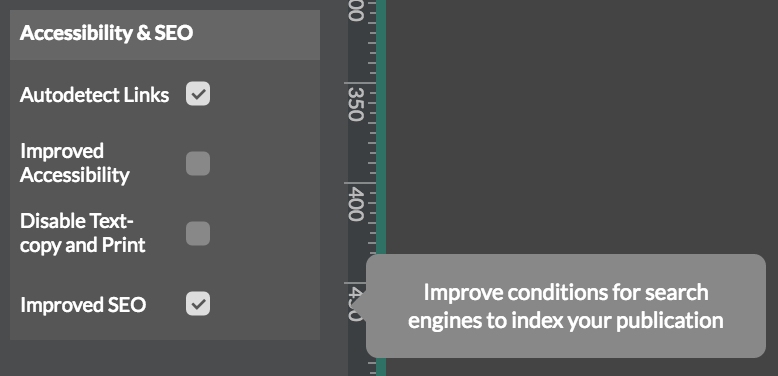
To access this feature you need to open the desktop Publisher and the settings in the 'Behaviour' tab on the left hand side of the desktop publisher.
Understanding how to improve your ranking
Zine and Elements behave differently in how they can expose your PDF content and its important to understand how they differ. FlowPaper Zine exposes each text fragment in a PDF document on a page-by page basis just as a PDF document would, with the exception that the publication is faster to load as it is split into smaller segments.
FlowPaper Elements on the other hand, detects and converts the texts in a PDF document at the same time as adding meta data for headers, pages and sections. PDFs do not contain meta data around things, so a main title in a PDF is just a larger font that typically appears on the first pages of a document. A main title in FlowPaper Elements on the other hand is an actual header tag (typically a H1 tag) as seen in the screen shot below.
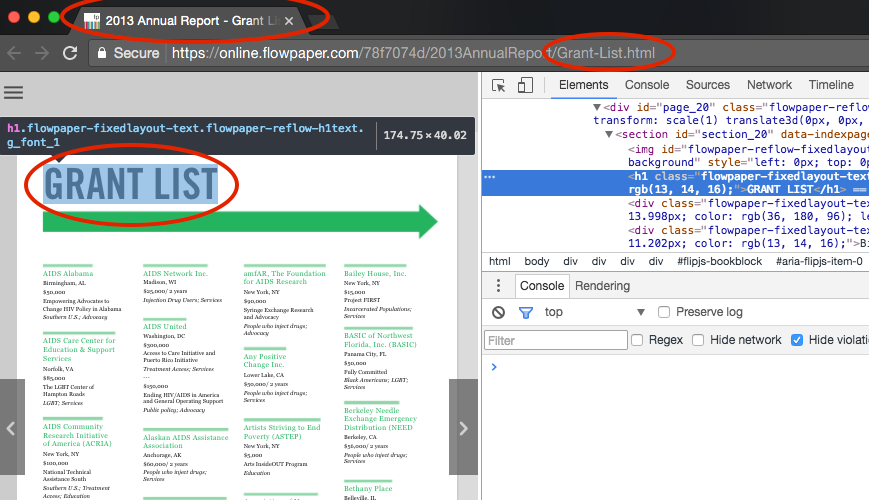
FlowPaper also defines each sub section of a publication with a title using a proper HTML5 tag. It also exports each section into its own HTML page and sets the title of the HTML page to correspond with each section as seen in the screen shot below. Changing the structure of your content and adding metadata around headers and pages has been seen in our studies to increase your search ranking.
Reading more
You can read a study and a more complete explanation of how search ranking gets affected by the way you publish using FlowPaper by reading this blog post.